Even if you uninstall Instrument X, some related files may remain.
If a software problem occurs and reinstallation is necessary, please delete the following related files completely:
¶ 1. Uninstall the Editor
If you are using an offline license, please deactivate it in the license panel within the editor.

¶ Uninstallation on Windows
- Open the [Settings] application from the Start menu.
- Confirm that Instrument X is listed in the [Apps] > [Installed apps] list.
From the three-dot menu [...], select Uninstall.
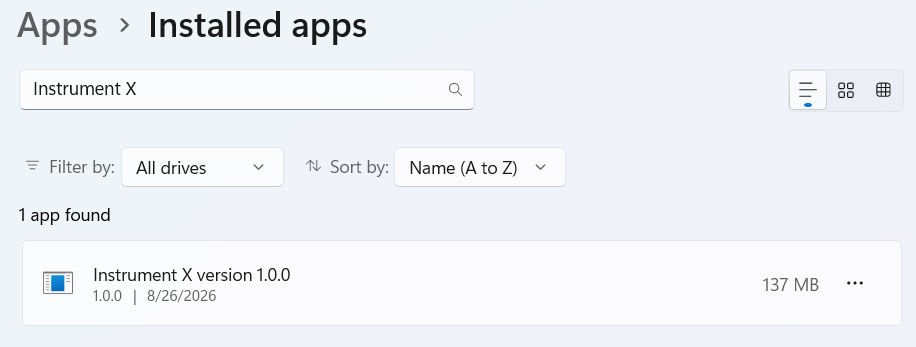
¶ Uninstall on Mac
- Select [Go] > [Applications] from the menu bar in Finder. (Or press Shift+Command+A)
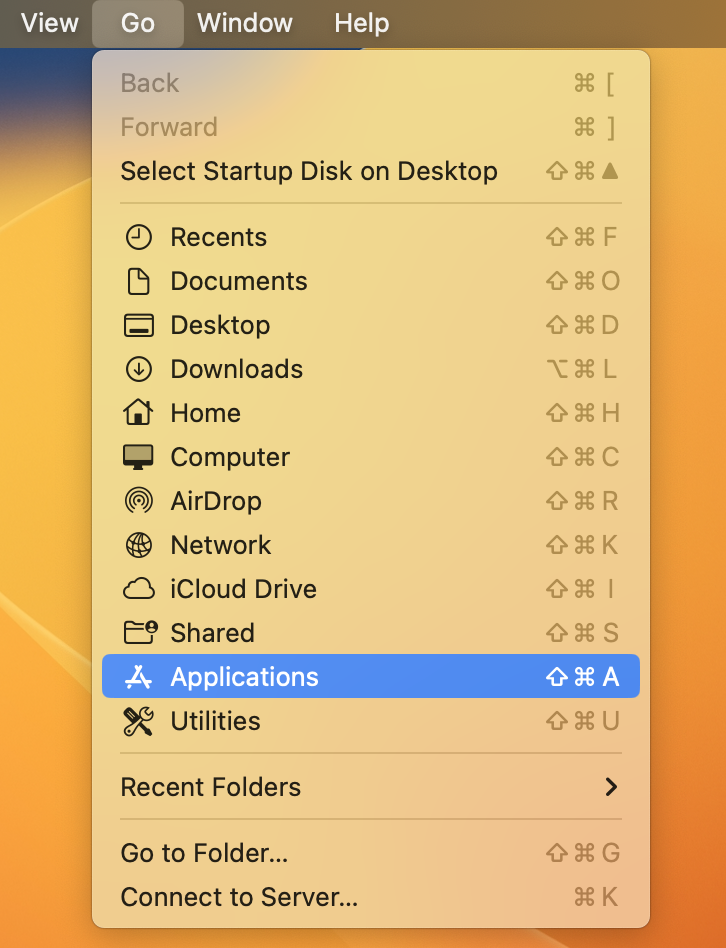
- Delete the
Instrument X.appfile.
¶ 2. Delete Related Files
¶ Delete System Folders
System folders contain settings, pronunciation dictionaries, scripts, and other data. Please back up these folders if needed.
Delete the following folders and their contents:
¶ Windows
C:\ProgramData\Dreamtonics\Instrument XC:\Users\<username>\AppData\Roaming\Dreamtonics\Instrument X
In the Explorer address bar
Enter C:\ProgramData\Dreamtonics\Instrument X to open the first folder mentioned above,
Enter %appdata%\Dreamtonics\Instrument X to jump to the second folder mentioned above.
¶ macOS
/Library/Application Support/Dreamtonics/Instrument X/Users/<username>/Library/Application Support/Dreamtonics/Instrument X
In Finder, press Command+Shift+G,
Enter /Library/Application Support/Dreamtonics/Instrument X to open the first folder mentioned above,
Enter ~/Library/Application Support/Dreamtonics/Instrument X to jump to the second folder mentioned above.
¶ Delete Plugins
Delete any Instrument X plugins found in the following folders:
¶ Windows
- VST3 (VSTi) Plugins:
C:\Program Files\Common Files\VST3 - VST3 (ARA) Plugins:
C:\Program Files\Common Files\VST3,C:\Program Files\Common Files\ARA - AAX Plugins:
C:\Program Files\Common Files\Avid\Audio\Plug-Ins
¶ macOS
- VST3 (VSTi) Plugins:
/Library/Audio/Plug-Ins/VST3 - VST3 (ARA) Plugins:
/Library/Audio/Plug-Ins/VST3,/Library/Audio/Plug-Ins/ARA - Audio Unit Plugins:
/Library/Audio/Plug-Ins/Components - AAX Plugins:
/Library/Application Support/Avid/Audio/Plug-Ins